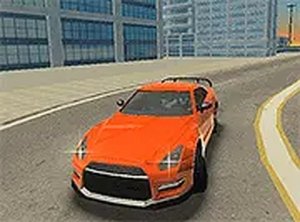
City Driving Simulator Arcade
Reviews
City Driving Simulator Arcade offers a unique sandbox driving experience with no restrictions. The open city allows for creative stunts and exploration at your own pace. Controls are responsive with keyboard and mouse, and the full screen mode enhances immersion. It is a great choice for players who enjoy freedom and practice without pressure.
About this game
Game Introduction
City Driving Simulator Arcade is a driving and racing game that places you behind the wheel of a high-performance sports car in a large urban environment. Unlike many driving games, this simulator removes common restrictions such as traffic jams, rival drivers, and law enforcement. This allows you to drive at full speed, perform stunts like drifting and burnouts, and explore every street and corner of the city without interruption. The game is designed for desktop play and works best with a keyboard or mouse. It is free to play and supports full screen mode for a more immersive experience. Whether you want to practice precise driving techniques or simply enjoy a relaxing cruise through the city, this simulator offers endless freedom and a sandbox-style experience.
How to Play
Players control the car using keyboard arrow keys: the up arrow accelerates, the down arrow brakes or reverses, and the left and right arrows steer. The spacebar activates the handbrake, which is useful for making sharp turns and initiating drifts. You can also use the mouse to look around the city environment. The game has no set objectives or time limits, so you are free to drive wherever you want and perform stunts at your own pace. The open world design encourages exploration and creative driving.
Game Features
Key features include an open world city with no traffic or police, allowing unrestricted driving. Free driving and stunt performance are core to the experience. Full screen mode is supported for a more immersive view. The game is optimized for desktop use, ensuring smooth performance with keyboard and mouse controls. The sandbox-style gameplay means there are no forced objectives, giving players complete freedom to set their own goals.
Tips for Success
To get the most out of City Driving Simulator Arcade, focus on mastering the handbrake for sharp turns and controlled drifts. Practice smooth acceleration and braking to maintain stability at high speeds. Use the mouse to look around and anticipate open spaces or obstacles. Since there are no built-in goals, set your own challenges, such as completing a perfect drift or exploring the entire city map. Regular practice will help you improve your driving skills and enjoy the game more.