Party Arena 3D Arcade Game
Reviews
Let's Party 3D delivers a clean and engaging arcade experience. The 15-second rounds are perfectly paced for quick sessions, yet the game encourages repeated play to improve your tile-painting strategy. The controls are responsive, and the speed boosts add a nice layer of tactical depth. Playing against AI opponents is challenging enough, while local multiplayer brings out the competitive fun. The colorful 3D visuals are cheerful and non-distracting. This is a solid choice for anyone looking for a light, family-friendly game that respects your time and offers genuine replay value.
About this game
Game Introduction
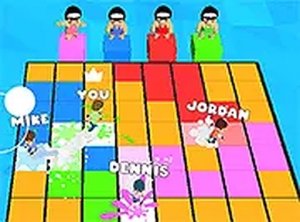
Let's Party 3D Online Arcade Game is a fast-paced multiplayer arcade experience where players compete in a vibrant 3D arena. The core objective is to claim tiles by running over them, painting them in your color to score points. Each round lasts only 15 seconds, creating intense, quick bursts of action. The game combines elements of racing and driving as you navigate the arena, using speed boosts to outmaneuver opponents. It is designed for up to four players, offering both solo play against AI and local multiplayer fun. The colorful graphics and simple yet addictive gameplay make it accessible to players of all ages, providing endless replayability in a party-like atmosphere.
How to Play
Players control their character using keyboard inputs, typically arrow keys or WASD, to move around the 3D arena. The goal is to run over as many tiles as possible to paint them your color. Each tile painted adds to your score. Speed boost power-ups appear on the field and can be collected to increase your painting speed, giving you a competitive edge. Rounds are timed at 15 seconds, requiring quick reflexes and strategic movement. At the end of each round, the game tallies the painted tiles and declares the player with the most tiles as the winner. The game supports local multiplayer, allowing friends to compete on the same device.
Game Features
This arcade game features vibrant 3D graphics that create a lively and engaging arena. It includes a four-player free-for-all mode, allowing you to play against computer-controlled opponents or challenge friends locally. Speed boost power-ups are available to enhance your painting speed. The game is designed for desktop play, runs smoothly in a browser, and supports full-screen mode for an immersive experience. It is completely free to play, with no downloads or installations required. The simple mechanics and short rounds make it ideal for casual gaming sessions.
Tips for Success
To excel, focus on learning the layout of the arena to plan efficient routes. Collect speed boosts whenever possible to paint tiles faster. Prioritize claiming clusters of tiles to maximize your score quickly. Keep an eye on opponents' movements to anticipate their paths and cut them off. Practice your reflexes to navigate tight corners and avoid collisions. In local multiplayer, communication with friends can add to the fun, but stay focused on your own strategy. Regular practice will help you improve your speed and tile-painting efficiency.