City Driver Simulator 3D
Reviews
City Driver Simulator 3D delivers a satisfying driving experience with its detailed 3D city and clear passenger missions. The gradual difficulty curve helps beginners learn while keeping experienced players engaged. The free, no-download format makes it easy to start playing instantly. A solid choice for casual driving fans.
About this game
Game Introduction
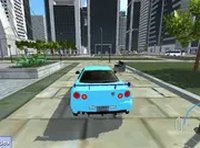
City Driver Simulator 3D offers a realistic driving experience directly in your browser. You control a vehicle in a detailed 3D city environment that includes traffic lights, road signs, and other vehicles. The main objective is to pick up passengers from marked locations and drop them off safely at their destinations. Each successful trip moves you forward, while collisions cause damage and can slow your progress. The game starts with simple routes and gradually introduces heavier traffic and more complex intersections. This design helps new players learn the controls and rules before facing tougher challenges. The free-to-play format requires no download or registration, so you can start driving immediately. Whether you have a few minutes or an hour, the game offers a focused and rewarding driving experience.
How to Play
Players use keyboard controls to steer, accelerate, and reverse their vehicle. The goal is to pick up passengers from marked spots on the map and drive them to their destinations without crashing. You must watch for traffic lights, stop signs, and other cars. Collisions cause damage and may end the level. To complete a level, you need to deliver all passengers safely. As you progress, traffic becomes denser and routes more complex. Staying alert, obeying road rules, and driving carefully are key to unlocking new levels and earning high scores. The controls are responsive and easy to learn, making the game accessible to players of all ages.
Game Features
Realistic 3D graphics create an immersive city environment. Passenger missions give clear goals and a sense of progression. Difficulty increases gradually, offering a steady learning curve. The game runs entirely in the browser with no downloads or plugins. A full screen mode enhances the driving experience. Controls are simple and keyboard-based, suitable for desktop play.
Tips for Success
Always obey traffic signals and signs to avoid collisions and damage. Plan your route before driving to save time and reduce risk. Practice on easier levels to master steering and braking. Stay patient in heavy traffic—rushing often leads to crashes. Keep an eye on your damage meter; a single big crash can end the level. Use the full screen mode for better visibility. Finally, take breaks if you feel frustrated—a calm driver is a safe driver.