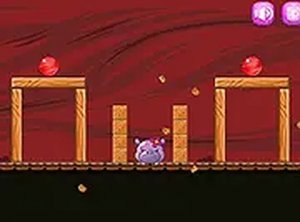
Candy Puzzle Arcade Game
Reviews
Eating Candy is a well-designed puzzle game that offers a satisfying mix of simplicity and challenge. The core mechanic of clicking to roll candy is intuitive, yet the level designs gradually introduce new twists that keep you thinking. The piglet animations add personality, and the lack of time pressure makes it ideal for casual play. While the game is not overly complex, it provides enough variety to stay interesting across many levels. It is a great choice for unwinding after a busy day.
About this game
Game Introduction
Eating Candy is a delightful puzzle game that brings a sweet challenge to players of all ages. The core concept is simple: help adorable piglets satisfy their craving for candy. You control the candy by clicking on the platform it rests on, causing it to roll across the level toward the piglet. Each level presents a new arrangement of platforms, requiring you to think carefully about the best sequence of moves. The charming visuals and cheerful sound effects create a relaxing atmosphere, making this game perfect for both quick breaks and longer play sessions. Available directly in your browser, Eating Candy offers an accessible and engaging experience without any downloads or installations.
How to Play
How to play Eating Candy is straightforward. Begin by looking at the layout of platforms and the position of the candy. Your goal is to make the candy roll to the piglet by clicking on the block that supports it. The candy will then roll in the direction you choose. Plan your moves to avoid letting the candy fall off the edge. As you progress, new obstacles and platform configurations appear, increasing the difficulty. You can play on desktop or mobile devices, and using full screen mode makes the experience more immersive. The controls are simple, but the puzzles require thoughtful planning.
Game Features
Fun puzzle gameplay that challenges your logic. Cute piglet characters with expressive animations. Simple click controls that are easy to learn. Increasing level complexity keeps the game fresh. No downloads needed, play directly in your browser. Full screen mode available for a better view.
Tips for Success
Take your time to study each level's layout before making a move. Consider the sequence of clicks carefully to ensure the candy reaches the piglet without falling. Practice helps you recognize common patterns and obstacles. If you get stuck, try a different order of moves or take a short break to refresh your thinking.